
MT5 · AUTOMATED MULTI-SYMBOL TRADING · SHARED RISK ENGINE
Automate the entries.
Guardian manages the basket.
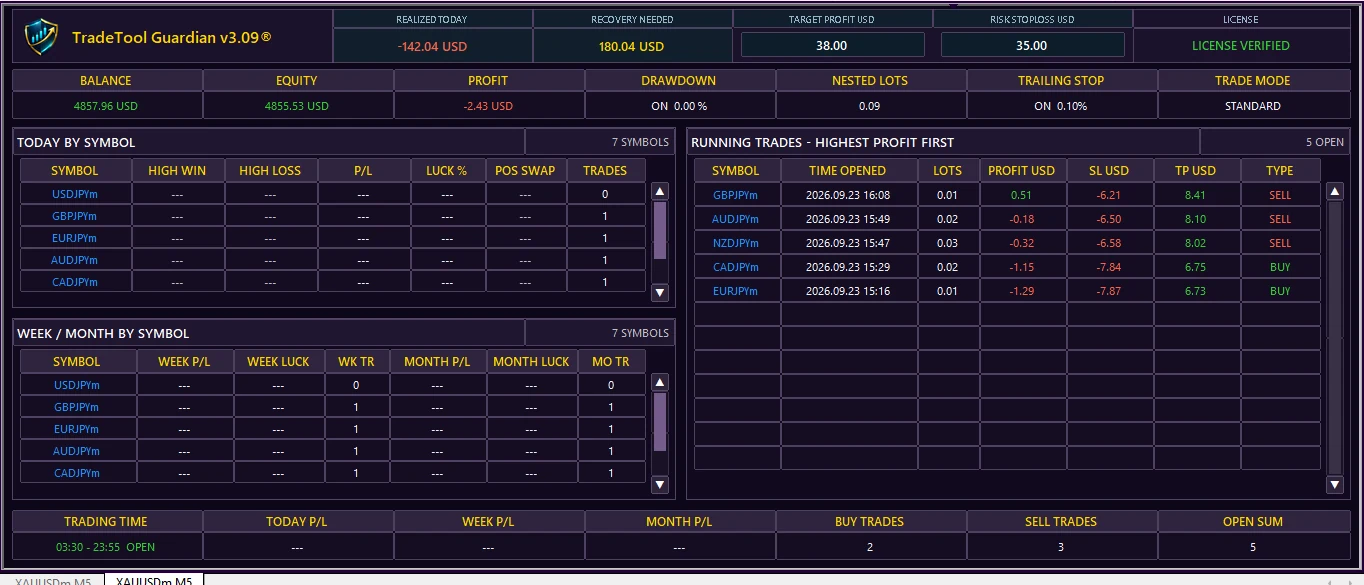
TradeTool Guardian is a MetaTrader 5 automated trading EA built to scan and trade multiple symbols while coordinating target profit, maximum basket risk, trailing protection and licensed account access from one system.
4 automated trading modes3 MT5 slots includedStandard + Full packagesXRP checkout
Guardian Auto Engine● AUTO TRADING ACTIVE
$35Maximum shared riskTRAILTighter stops stay protected
01
WHAT IT IS
An automated trading engine with basket-level control.
Guardian can open trades automatically using one of four selectable strategies, then manage the open TradeTool basket with a shared profit target, maximum risk budget and trailing-stop protection. You choose the symbols, mode and limits; the EA handles execution.
STANDARDREVERSEPOTENTIAL STANDARDPOTENTIAL REVERSEShared basket TP / SLTrailing-stop priority
02
AUTO TRADING + PROTECTION
One engine for entries, symbols and basket risk.
Multi-symbol automated execution
Trade a comma-separated list of broker symbols from one EA. Each symbol is processed independently with automatic magic-number assignment.
Four selectable trading modes
Use STANDARD or REVERSE Bollinger/H1 logic, or the session-aware POTENTIAL STANDARD / POTENTIAL REVERSE sweep-and-breakout engine.
Shared target and maximum risk
Set one money target and one maximum basket risk. As EA trades open or close, Guardian recalculates the current basket in account currency.
Authorized MT5 access
Your licence works only with the MT5 login + exact broker-server combinations registered in your secure customer portal.
03
WORKFLOW
From portal authorization to automated execution.
- AuthorizeRegister your MT5 login and exact broker server in the customer portal.
- InstallDownload the current EX5, attach TradeTool Guardian and enter your private licence key.
- ConfigureChoose your trading mode, symbols, lot-risk settings, Target Profit and Risk Stoploss.
- AutomateGuardian scans the configured symbols, opens qualifying trades and manages the live basket automatically.
Automated for MT5Windows desktop · EX5 distribution
04
PACKAGES
Choose how much MT5 account flexibility you need.
Both packages include three MT5 account slots and secure access to the TradeTool Guardian customer portal. The difference is how account registrations are managed after you add them.
STANDARD PACKAGE3 MT5 SLOTS
$29.99
- 3 MT5 account slots included
- Registered accounts stay locked to your profile
- TradeTool Guardian + TTG Pulse downloads
- Licence + account management
- Additional slots available after activation
Once an MT5 account is registered on the Standard Package it cannot be removed or swapped from the customer portal. Additional slots are $11.99 each after a package is active.
FULL PACKAGEACCOUNT SWAPS
$149.99
- 3 MT5 account slots included
- Swap up to 2 registered MT5 accounts every 24 hours
- TradeTool Guardian + TTG Pulse downloads
- Licence + account management
- Additional slots available after activation
The Full Package unlocks account removal and replacement controls. The two-swap limit is measured across a rolling 24-hour period.
Extra MT5 slots are $11.99 each and can only be purchased from the customer portal after either package is active.
05
FAQ
Before you install Guardian.
Does it place trades automatically?
Yes. TradeTool Guardian is an automated MT5 EA. It can open trades using STANDARD, REVERSE, POTENTIAL STANDARD or POTENTIAL REVERSE, depending on the mode you select.
How does basket risk work?
When Target Profit is above zero, the open TradeTool positions share that combined money target. When Risk Stoploss is above zero, the EA distributes a maximum combined loss across the open basket. A tighter trailing stop is never loosened just to use more risk.
Can I choose my own symbols?
Yes. Symbols are supplied as a comma-separated list, so you can use the exact broker symbol names you want TradeTool Guardian to scan and trade.
How many MT5 accounts are included?
Both the Standard Package and Full Package include three MT5 account slots. Additional slots are $11.99 each and become available only after a package is active.
Can I change a registered MT5 account?
Standard Package account registrations stay locked once added. Full Package customers can remove and replace up to two registered MT5 accounts in any rolling 24-hour period.
How is payment handled?
XRP checkout is available directly through the customer portal. Send the exact quoted XRP amount with the displayed destination tag; confirmed payments appear in Billing and Invoices.
Is profit guaranteed?
No. Automated trading carries risk. TradeTool Guardian does not guarantee profits, prevent every loss, ensure prop-firm compliance or guarantee payouts.